Print security
Protect documents, printers and sensitive data with authentication, permissions and held printing.
Education centers print lists, exams, authorizations, administrative documents and personal jobs. PryntControl helps ensure every print has a responsible user, is released at the right moment and follows the center policies.
Security starts before printing
It is not only about protecting a printer. It is about controlling who has access, what they can do, how they identify themselves and when each document is released.
Identity
Every action can be tied to a user.
Permissions
Access depends on role, group and device.
Privacy
Documents are released only when the user is present.
Traceability
The center knows who prints, copies or scans.
Security features
These three features are the foundation of secure printing in PryntControl.
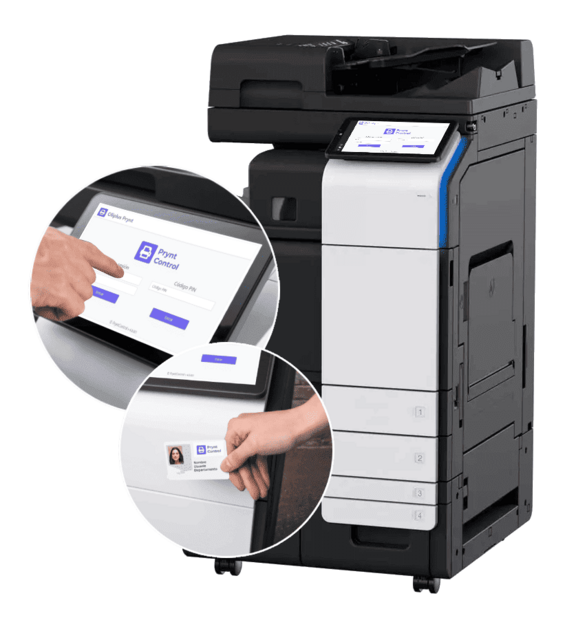
Authentication
Username and password, PIN or center cards.
Authentication makes it possible to know who is using each device before printing, copying or scanning. PryntControl adapts to different levels of friction: traditional credentials, quick PIN or card/badge for high-traffic environments.
- Identify students, teachers, administration or external users.
- Reduce anonymous jobs and hard-to-attribute consumption.
- Enable a fast experience on shared devices.
Access control
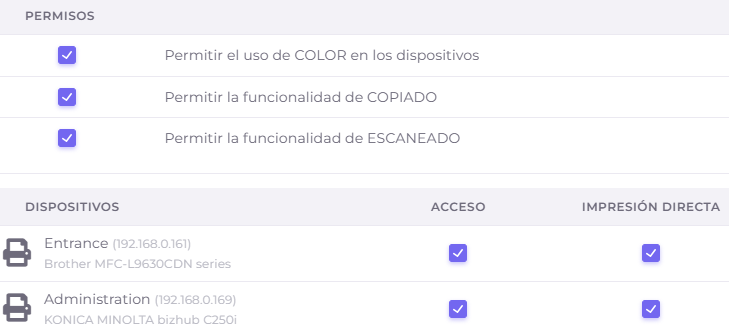
Define who can use each device, feature or policy.
Not every user needs the same capabilities. Access control can restrict printer, color, copy, scan or advanced features depending on role, group, department, site or center needs.
- Different permissions for students, teachers and administration.
- Rules by device, location or user group.
- Less misuse and more consistency across the fleet.
PrynToMe held printing
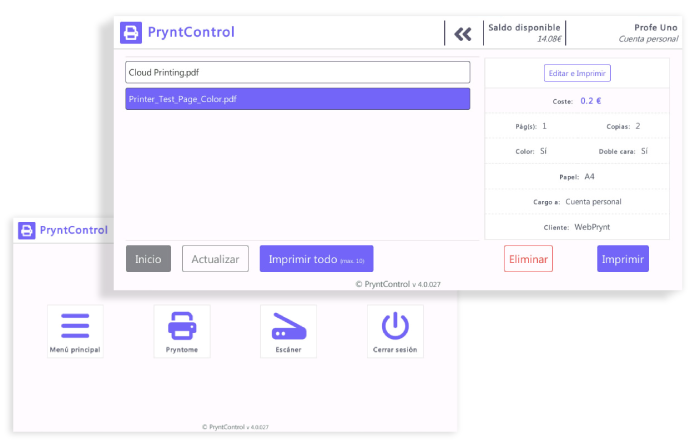
The document is not printed until the user identifies themselves.
PrynToMe prevents documents from being left in the output tray. The user sends the job, walks to an available device, identifies themselves and releases only what they need to print.
- Reduce abandoned documents and paper waste.
- Improve privacy for exams, lists and sensitive documents.
- Release jobs on the most convenient device.
Want to review the secure printing flow for your center?
We can show how to apply authentication, permissions and PrynToMe in classrooms, offices, libraries and shared rooms.