Printer authentication
The user identifies at the device with credentials, PIN or card depending on the center configuration.
Scanning included by default: the user authenticates, scans and collects the document from the PryntControl web portal.
PryntControl includes scanning inside the on-premise flow. The user identifies at the printer, opens the PryntControl scanning application, selects scan options, starts the job and the digitized document becomes available in their web portal.
The goal is to make scanning as simple as printing, but with traceability and control. The document is not lost in shared folders and does not depend on manual settings on each device.
The scan is linked to the user at the printer.
The document is sent to PryntControl on-premise.
The user collects the scanned document online.
The center avoids anonymous or uncontrolled scans.
Scan to user profile is the foundation of PryntControl integrated scanning.
The scanned document becomes available in the authenticated user web portal.
This feature avoids generic destinations and shared folders that are hard to control. Each scan is associated with the user authenticated at the printer and delivered through the PryntControl web portal.
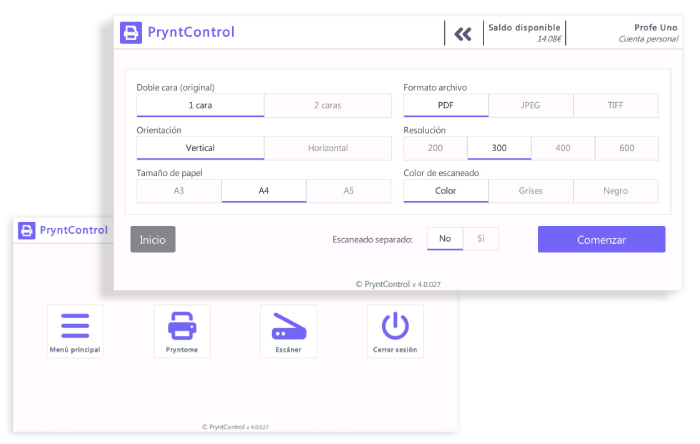
The user identifies at the device with credentials, PIN or card depending on the center configuration.
From the printer screen, the user opens the integrated scanning application.
The user selects options such as format, resolution, color or document type.
The printer sends the digitized document to the PryntControl on-premise server.
The user accesses the web portal and downloads or manages the scanned document.
If the center needs to send scanned documents to cloud services or expand connected destinations, it can activate cloud scanning as an additional feature synchronized with the on-premise server.
See cloud scanning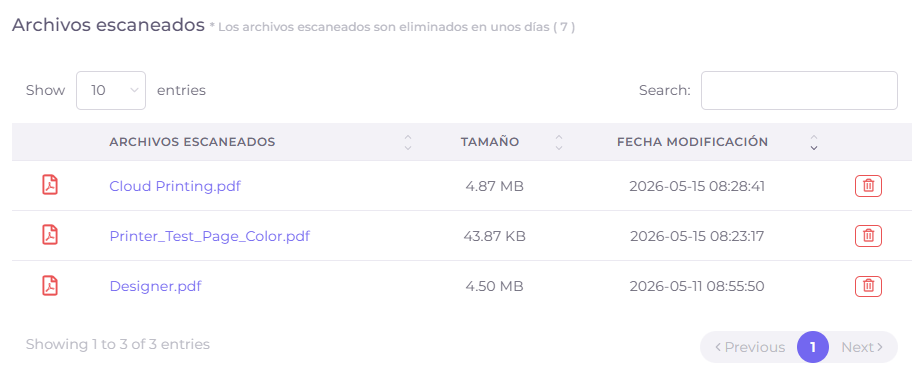
We can show the full process: printer authentication, scan options, server delivery and web portal collection.